
How to Chromecast From a Mac to a TV: A Native Player Written in Osprey
A Mac has no Cast button. Chrome can cast a browser tab, and a phone can cast from an app, but neither will take an MP3 from your Mac and play it on the TV with proper controls. So I wrote a small native player that does just that. It runs on macOS, finds every Chromecast and Google TV on your network, and plays a local audio file on whichever one you pick.
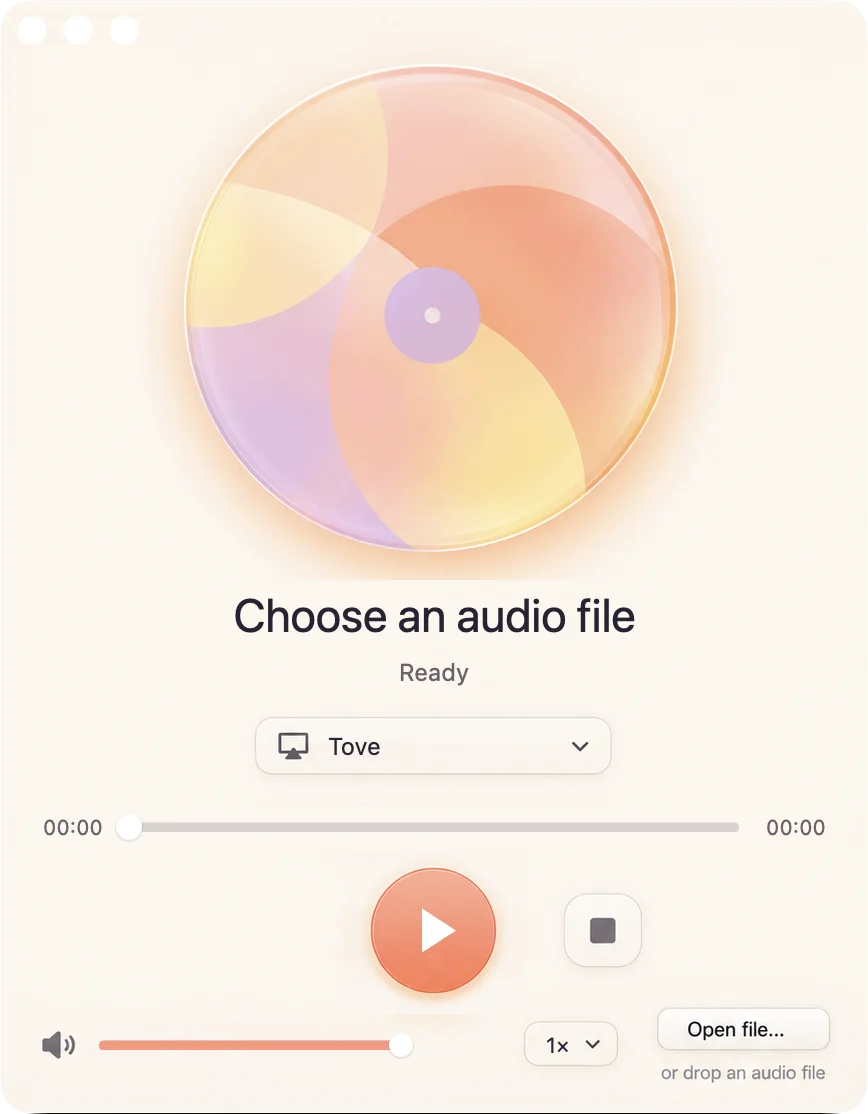
The player is written in Osprey, a functional language built for safety, elegance and performance. It is also the first real application built on two things Osprey gained this week: UI machines, where the whole interface is one data file, and @osprey/chromecast, a Cast sender package.
What it does
- Finds your TVs. It lists every Chromecast and Google TV that answers on the local network, by the name you gave it, such as "Family room TV". If none answer, it says so and offers to look again.
- Opens a file your way. Use Open file…, or open an MP3 with the player from Finder.
- Plays it with real controls. Play, pause, resume, seek by dragging the position bar, change the TV's volume, and change speed. The controls show what the TV reports, not what the app hopes happened, so a paused TV shows as paused.
- Moves on the TV. A Chromecast shows only still artwork for audio. When
ffmpegis installed, the player turns the music into a video of its own spectrum, drawn as it plays, so the TV shows something alive. You can still seek anywhere from the first second. Withoutffmpegit casts the plain audio. - Says why when something fails. An unreachable TV, a dropped connection or a missing file appears in the window as a reason, not as a frozen button.
How casting from a Mac works
A Chromecast never receives your file directly. The sender tells the TV where to fetch it, and the TV downloads it over your network. The player does every step a Cast sender has to do:
- Discovery. macOS's own
dns-sdlists the_googlecast._tcpservices on the network. Each answer gives the TV's friendly name, its.localhost name and its port. - A session. The player opens a TLS connection to the TV and speaks the Cast protocol: small protobuf frames, plus a heartbeat every few seconds so the TV keeps the session open.
- Launch and load. It starts the TV's Default Media Receiver and asks it to load a URL.
- Serving the file. That URL points back at your Mac. A small HTTP server inside the player serves only that one file, with byte ranges so the TV can seek, on the network interface that routes to the TV. For the visualiser, it serves an HLS playlist and its segments instead.
- Controls and status. Each button sends one media command. The TV answers with its state and position, and the window updates from those answers.
The window never waits on the network. Discovery runs as a host process, and each frame checks the TV for at most a millisecond, so dragging the volume stays smooth while the TV answers.
Built from a state machine
There is no layout code in the player. Its interface is player.machine.json: four parallel state machines (receivers, playback, commands and menu), the inputs they read, and three skins. When a state is entered, it asks for work by name. Entering connecting asks for cast.start with the chosen file and TV. A small Osprey adapter answers those requests with the Chromecast package:
answer (store, ask) = match ask.askName
    "cast.start" => start (store, ask)
    "cast.pause" => live (store, \p => Player::pause p)
    "cast.resume" => live (store, \p => Player::play p)
    "cast.volume" => live (store, \p => Player::volume (p, Machines::askedNumber (ask, "wantVolume")))
    _ => asked (failed (store, "the machine asked for an unknown request ${ask.askName}"), [])
The last arm matters. A request the adapter does not know becomes an error on screen, never a silent no-op. Osprey has no exceptions and no panics. Every failure here, from a refused connection to a missing file, is a value the code must handle.
Tested without a TV
Every byte the sender reads or writes goes through one algebraic effect, Wire. In the app, Wire.Native answers it with real sockets. In the tests, a handler plays the TV instead: it reads every frame the player writes and answers the way a real receiver does. Four end-to-end journeys drive the real player through the same two functions the window calls, with no window and no network:
ok 1 - a whole cast: find TVs, open a file, play, pause, seek, change volume and speed, stop and replay
ok 2 - skins change the palette, never the controls
ok 3 - no TVs found offers another search, and an unreachable TV shows why
ok 4 - the canvas: every control is reached by its accessible label, through pointer events alone
# tests=4 passed=4 failed=0 skipped=0
The Chromecast package was also checked by hand against a real Chromecast and a real Google TV, and an opt-in live check casts a six-second tone to your own TV and confirms play, pause, resume, seek, volume and the end of the track.
Try it
You build the player from source for now. On a Mac with Rust, Homebrew's openssl, and optionally ffmpeg for the visualiser:
git clone https://github.com/Nimblesite/osprey && cd osprey
make build                     # the Osprey compiler
make _runtime_macos            # the Mac runtime
bash src/osprey/examples/casting/run.sh   # opens the player
Pick a TV, choose an MP3 and press play.
Limits to know first. It plays MP3 files only. It accepts the TV's certificate without verifying it, because Cast devices present self-signed certificates. It has been tested on macOS. The other two skins in the document, Midnight Mint and Poolside Pop, are still being laid out, so the player opens in Sherbet Signal.
Osprey is actively evolving. Try it on your projects, validate it against your workload, and assess the risks before relying on it in production. The player's README and the Chromecast package README cover the rest.