Building native iOS and Android apps with Osprey
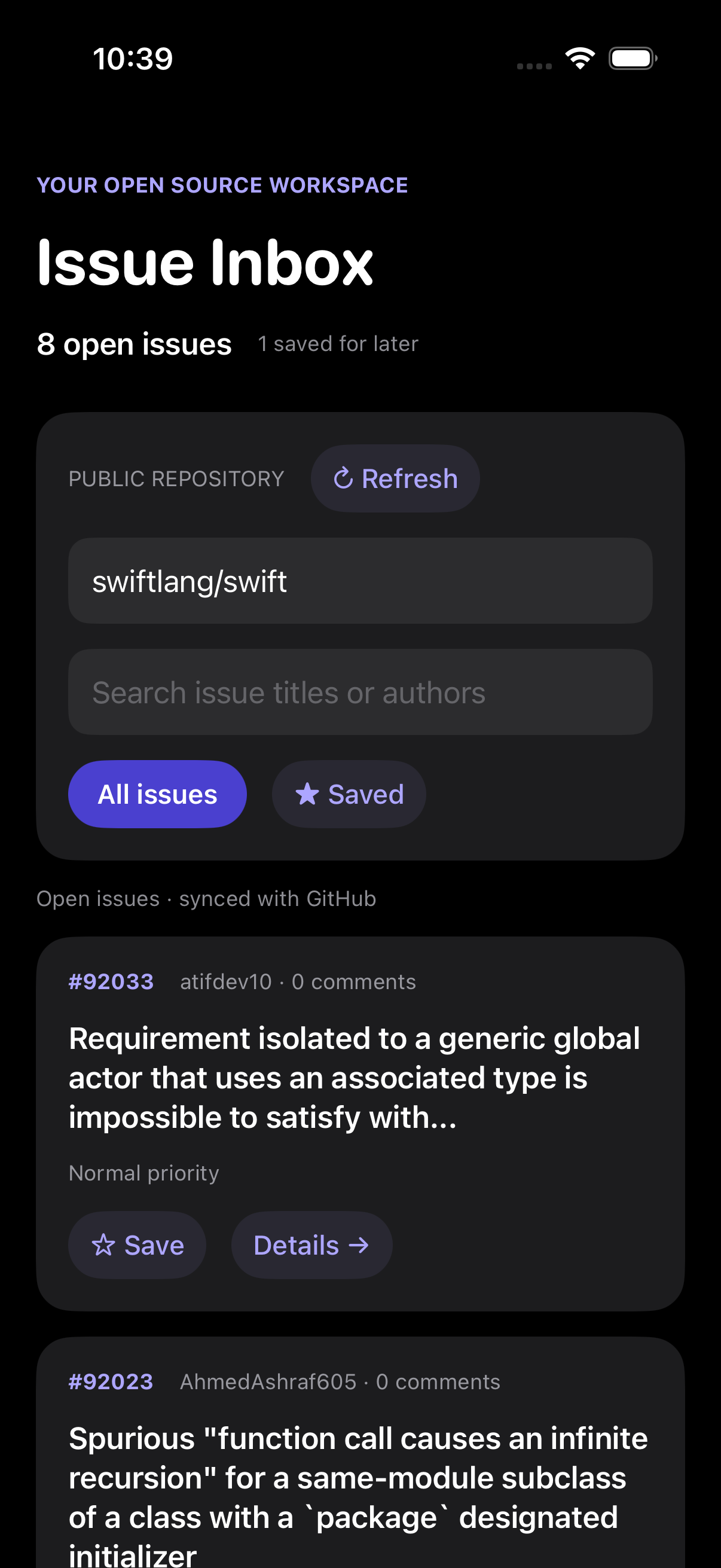
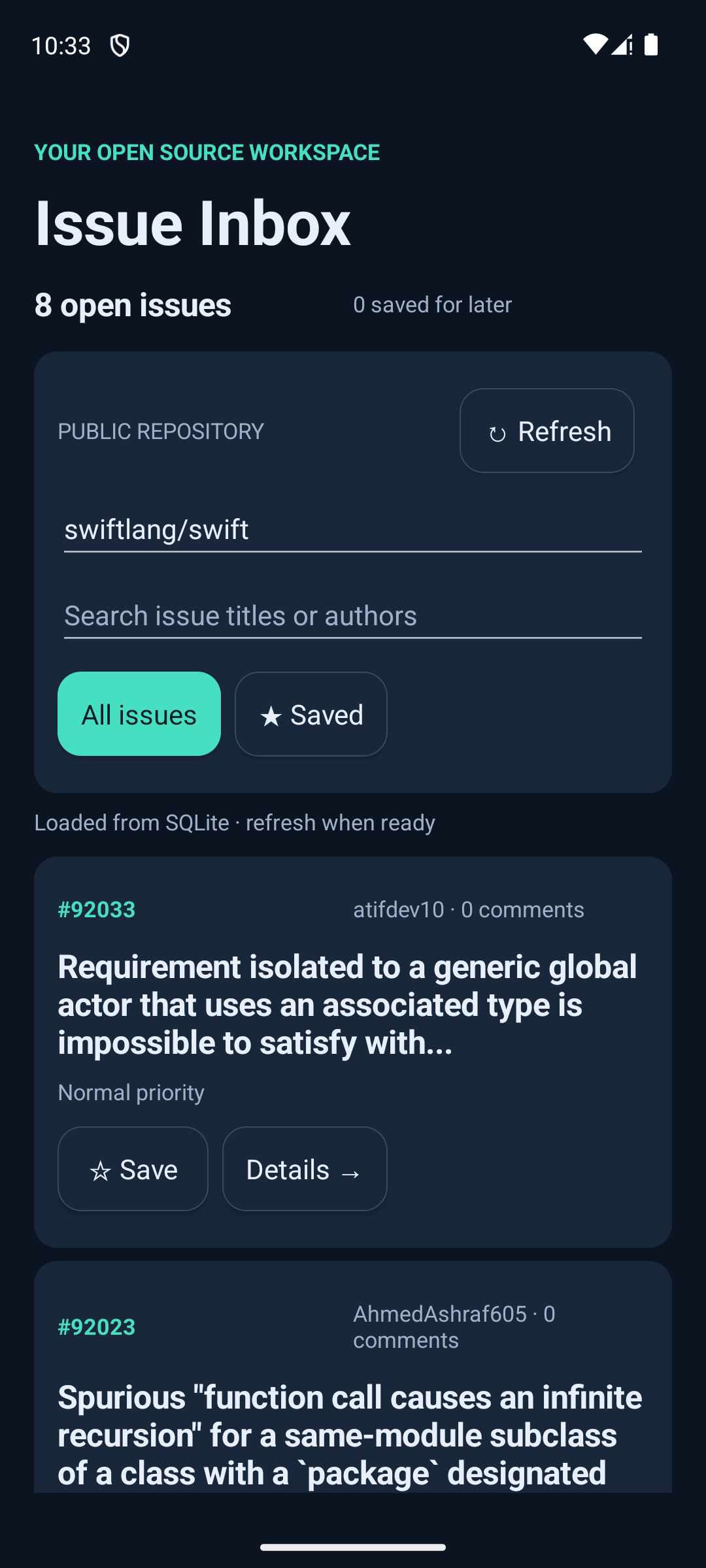
Issue Inbox is a native iPhone and Android application built around the same Osprey project. Typed effects request SQL and HTTP work; a reusable handler turns those requests into native host commands. Its model, update functions, UI layout, GitHub decoding and local triage live in Osprey modules. SwiftUI and Android widgets render the UI description and send events back to Osprey.
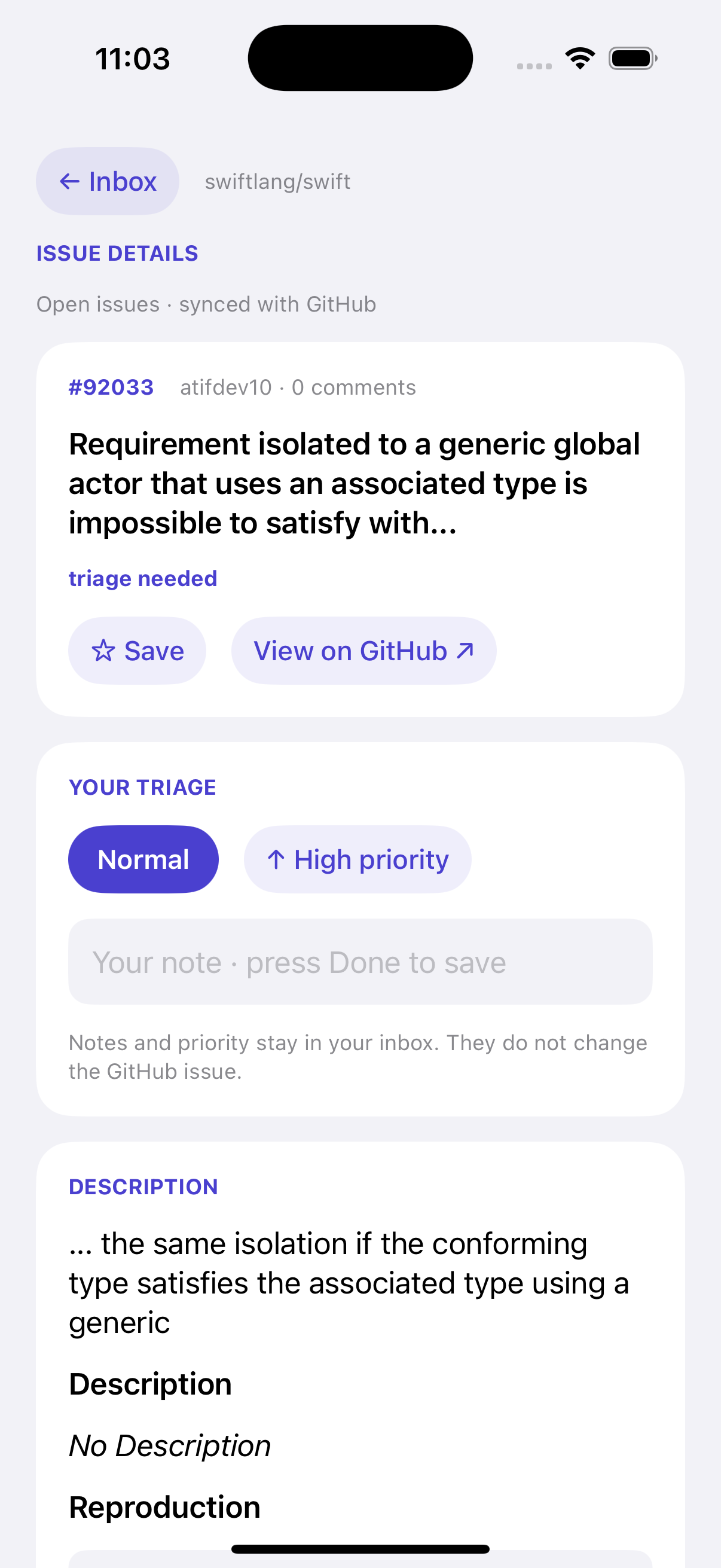
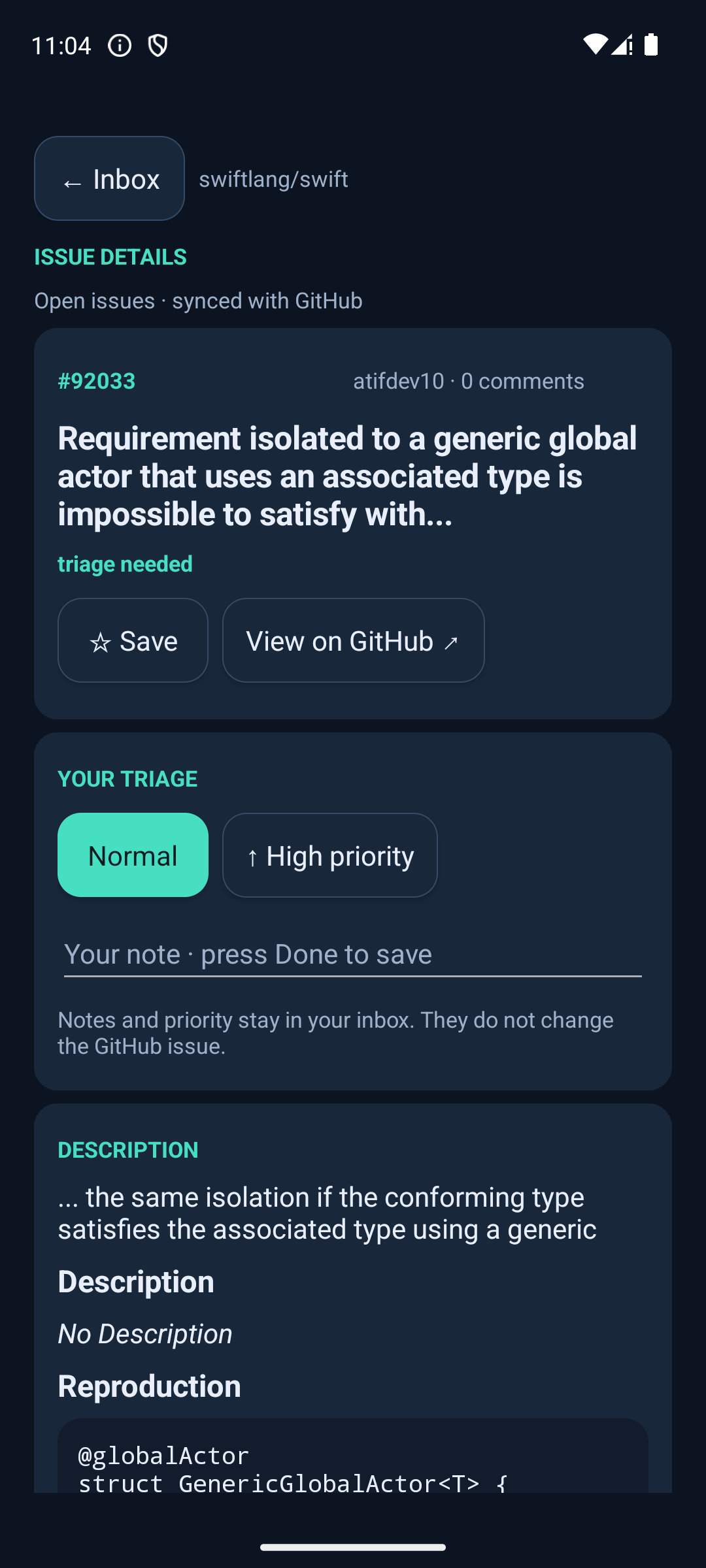
These are actual captures of the running application. The iOS screenshot comes from an iPhone 17 Pro simulator; the Android screenshot comes from a Pixel 7 emulator. The iOS build has also been installed and verified on a physical iPhone 16.
The complete source and launch scripts are in examples/mobile/. Build this example from a repository checkout using the platform prerequisites below.
For a banking example, Talon Bank's native clients share the web app's screens, state transitions, validation and API commands. SwiftUI and Android widgets use the same Bridge::Render effect through native C exports. The web app guide explains the shared boundary; its source README includes build and device-test commands.
What Issue Inbox does
Open issues for a public GitHub repository, search titles and authors, save issues for later, and open their descriptions and labels. Osprey parses description Markdown into headings, lists, quotes, code, emphasis, and links that the native hosts render. Add a local note or set a priority on the detail screen. Successful refreshes and local edits are saved to SQLite; a populated cache opens without requiring a network request.
The UI reacts to each event. Typing a search, choosing a filter, opening an issue, or receiving an HTTP response runs an Osprey update function and produces the next UI description. The platform renderer updates its native controls, preserving the active input while typing.
Notes and priorities remain local. The example reads public GitHub data and does not post changes to GitHub. It requests one page of open issues, excludes pull requests, and starts with swiftlang/swift. Authentication, pagination, and background refresh are not implemented.
Application effects
The Storage module declares the operations needed by the update code:
export effect Requests
    sql : SqlRequest => string
    http : HttpRequest => string
SqlRequest carries an id, statement and parameters; HttpRequest carries an id and URL. The update code performs Storage::Requests.sql or Storage::Requests.http with these request records. The production Storage::commands function installs a reusable handler whose arms serialize them as JSON commands. The application selects that implementation at its boundary:
export initial () = Storage::commands Update::initial

export dispatch model event =
    Storage::commands (\() => Update::dispatch model event)
Tests run the same update functions under substitute Storage::Requests handlers. They can record the SQL, parameters and request URL without SQLite or a network connection.
These are value operations: the handler returns a command description immediately. The native host executes it after Osprey returns and delivers completion as another event. Asynchronous HTTP does not require capturing an Osprey continuation. See the algebraic effects guide for callable handlers and block scope.
How the native boundary works
The compiler turns Osprey into native app-logic code through LLVM and emits a static archive plus a C header. The phone runs that compiled code. The Swift or Android project supplies the app executable, native rendering, platform services, and lifecycle.
| Layer | Responsibility |
|---|---|
| Shared Osprey modules | Application state, events, UI tree, labels, layout, validation, GitHub decoding, SQL, and local triage |
| SwiftUI host | Native iOS controls, SQLite execution, HTTPS requests, and lifecycle |
| Android host | Native Android controls, SQLite execution, HTTPS requests, and a small JNI bridge |
| Generated C interface | Scalar calls and copied UTF-8 messages between Osprey and the host |
After osprey_main() initializes the library, the host calls osprey_mobile_start() and then osprey_mobile_dispatch(model, event). Each call returns a JSON envelope containing the opaque model, view data, UI tree, and commands. The host executes requested SQL or HTTP work and returns its result as another event. All calls into Osprey are serialized on the host's main thread.
The update loop uses ordinary modules and value handlers. Reactive updates are driven by explicit events; the staged-effects reactive runtime is still planned.
Run on iOS
Use an Apple silicon Mac with Xcode, the iOS SDKs, an installed iPhone simulator, and the repository's Rust/LLVM prerequisites. From the repository root:
make _runtime_ios _runtime_ios_sim
cargo build --release -p osprey-cli
examples/mobile/ios/run.sh ios-sim
The launcher builds the shared project, links its generated archive into the SwiftUI app, installs it, and opens the simulator app. To run the deterministic native application smoke test:
examples/mobile/ios/run.sh --smokeFor a connected iPhone with Developer Mode enabled and signing configured:
OSPREY_DEVELOPMENT_TEAM=YOUR_TEAM_ID examples/mobile/ios/run.sh ios-deviceSet OSPREY_DEVICE_ID to choose a physical device, or OSPREY_SIMULATOR_UDID to choose a simulator. Xcode handles signing and deployment. examples/mobile/ios/run.sh --build ios produces an unsigned device build for inspection.
Run on Android
Use JDK 17, Android SDK 34, an installed Android NDK, and an emulator or phone running Android API 26 or later. From the repository root:
make android
examples/mobile/android/run.sh
The build creates ARM64 and x86-64 Osprey archives, links the JNI library, and packages the Kotlin host as a debug APK. The launch script installs it on the selected device. The APK is written to examples/mobile/android/app/build/outputs/apk/debug/app-debug.apk.
make android-test
examples/mobile/android/run.sh --live-smoke
make android-test checks the C ABI, supported language goldens, and deterministic application behavior. The separate --live-smoke exercises actual GitHub responses. Select a device with OSPREY_ANDROID_SERIAL; set ANDROID_HOME or ANDROID_SDK_ROOT for the SDK, and ANDROID_NDK_HOME or ANDROID_NDK_ROOT for the NDK. The scripts also discover standard local installations.
Compile the library directly
The native host build scripts perform these steps for the sample. To compile another host around the same Osprey project:
osprey build examples/mobile/inbox --target=ios -o build/ios/inbox.a
osprey build examples/mobile/inbox --target=ios-sim -o build/ios-sim/inbox.a
osprey build examples/mobile/inbox --target=android-arm64 -o build/android-arm64/inbox.a
osprey build examples/mobile/inbox --target=android-x64 -o build/android-x64/inbox.a
Each archive has a sibling .h file. iOS targets use ARM64 with a minimum of iOS 15; Android targets use API 26 for ARM64 or x86-64. The library must match the host application's architecture and platform.
Target checks and current limits
Mobile C ABI targets currently support --memory=default. GC, ARC, native debugger/profiler options, and --run are rejected. The host owns application launch and asynchronous platform work.
The compiler also rejects dynamic control handlers, unavailable process operations, and built-in HTTP/WebSocket calls for mobile targets before LLVM or linking. Use native platform services through explicit C imports or an application command protocol, as Issue Inbox does. Value-operation handlers remain available.
C-callable functions use int, float, bool, string, and return-only Unit. Records, collections, closures, and unresolved generic helpers stay inside Osprey. Unsupported extern fn signatures, invalid or colliding C names, and exported functions with unhandled effects are compile errors.
The host copies returned strings before the next call and must not free Osprey-owned pointers. General allocations in the initial mobile default runtime live for the process lifetime; a public release or teardown API is not implemented. The C boundary remains outside Osprey's memory-safety guarantee.
Native smoke tests exercise the real compiled archive with isolated SQLite storage and deterministic HTTP responses. They cover reactive search and filtering, issue details, local annotations, persisted cache, and visible HTTP errors. Android also checks cache restoration after terminating and reopening the app process. Recorded device/emulator execution is distinct from merely building an architecture's artifact.
Read the iOS target specification, Android target specification, and reactive application specification for the full contracts. For browser applications with a similar model/update boundary, see the WebAssembly application guide.